Thursday, April 3, 2014

Say no to water between meals

Say no to water between meals

Written By Admin on April 4, 2014 | Friday, April 04, 2014


Glugging water during meals severely hampers your stomach's digestive powers and causesinsulin levels to fluctuate significantly, warns Microboitic counsellor Shonali Sabherwal

To know if you're drinking enough water, it is often said, just check if you are feeling thirsty. If you aren't, your fluid intake is likely to be just about right. But downing glasses of water along with your meals may not be the best time to quench your thirst.

Macrobiotic counsellor Shonali Sabherwal explains why you should not drink water during your meal. "Most Indians have water along with their meals. The usual theory is washing down the food while eating. People have no idea how wrong this practice is and how difficult this can be for their digestion. For those suffering with digestion problems, the ramifications are manifold. Our stomachs have a knack of knowing when you will eat and starts releasing digestive juices immediately. If you start drinking water at the same time, what you are actually doing is diluting the digestive juices being released to digest your food, thereby hindering them from breaking down food."

Research shows that sipping a little water during meals isn't a cause for concern but drinking a glass or two may interfere with digestion. It is best to drink fluids before and two hours after meals as this helps in absorption of nutrients, researchers have found.

Elaborating on what exactly happens inside you when you glug water during meals, Sabherwal says that it gets absorbed by the intestinal walls of the stomach. "This absorption continues till it becomes concentrated enough for the digestive juices to begin digesting your food. However, due to it getting mixed with water, this concentrated substance is now thicker than the food contents present in your stomach. So less gastric juice will be secreted to digest your food. The result is, undigested food leaks into your system as it gets absorbed through the stomach walls. This will also lead to acid reflux and heart burn." Drinking water with meals can also cause a surge in your insulin levels, almost like the way high glycemic food would affect you, Sabherwal cautions. "The more insulin is released in to your blood stream, the higher the chances of you storing fat in your body."

To avoid watering down your meals, Sabherwal suggests a few don'ts. "Make sure your food is not too salty as that would aggravate your thirst and trigger your need to down more water. Besides, eating in a hurry will cause you to gulp your food down. Most likely, you would feel the need to wash it down with water while you are at it. Instead, chew, chew and then chew some more. We secrete a lot of digestive juices (enzymes) while chewing, which makes our stomach's job easier."

POSB Interest Calculator - updated - 01/04/2014)


POSB Interest Calculator - updated - 01/04/2014)

Written By Admin on April 4, 2014 | Friday, April 04, 2014

(Last updated - 01/04/2014)


Click Here to Download


Features in this File:

Updated on 01/04/2014:
  • New Interest rates w.e.f. 01/04/2014 configured for RD, TD schemes. Old interest rates can also be calculated by entering the concerned Date of opening
  • RD PMC Calculator link is added in the Main page of Calculator.
  • Option for calculation of "Maturity Amount for Discontinued/Extended RD accounts" is provided in RD-View more Link.
  • "Print Tables/Forms" link is provided in Main calculator page to Print Ready reckoner tables for RD/TD/MIS and Pamphlet, Forms. (Ready reckoners and tables have been updated for new interest rates w.e.f 01.04.2014)
  • Changes have been made for PMC of TD accounts before 1 year.


Updated on 12/05/2013: (As per suggestion/request received from users)

  • In SCSS "View more" link, Initial partial interest and Final partial interest payable (for fraction of days) according to the date of opening will be displayed in addition to the quarterly interest payable for SCSS deposit. For SCSS PMC also, final partial interest applicable will be displayed.
  • Possibility of extension of SCSS account will be displayed along with the interest rate applicable for such accounts.
  • To calculate maturity amount of Discontinued/Extended RD accounts, option has been included In RD "View more" link, and the the same will be displayed if 5 years completed.
  • Navigation link to "Home page" has been uniformly placed in all pages at bottom.
Updated on 28/04/2013:
  • "MIS Total Interest" shown in the table for Today's date (i.e.,Date of Opening is not entered and left as blank cell) has been corrected for 60 months instead of wrongly calculated 72 months in old calculator.
  • (But, If you enter Date of opening in MIS, it will correctly calculate "Total Interest" for 60(or)72 months according to the entered Date of opening, even in old calculator)
  • "PPF Loan/Withdrawal" calculation link and "MIS to RD Automatic credit Maturity" calculation link have been included in main table;
  • Welcome message will be displayed at the bottom of calculator (according to the time of opening calculator file)
Updated on 15/04/2013:
  • In the Link "PPF Interest Calculation", Provision has been added to find out Eligible Loan and Withdrawal amount that can be taken in PPF account.
  • In the Link "Print Tables/Forms", Claim Forms for SB/SC and Application for Reinvestment of Maturity value, and Interest Rate Table (in Tamil) and link to access "Indiapost Forms page" are included.
Updated on 01/04/2013:
  • New Interest rates w.e.f. 01/04/2013 configured for all schemes.
  • Old interest rates can also be calculated by entering the concerned Date of opening
  • RD PMC Calculator can be downloaded from RD "View More" link
  • "Print Tables/Forms" link is provided in Main calculator page to Print Ready reckoner tables for RD/TD/MIS and Pamphlet, Forms.
Updated on 06.11.2012:
  • Validation for KVP Date of Purchase (Now Date can be entered only from 01.03.2003 to 30.11.2011)
  • Feedback form modified.
Updated on 31.10.2012
  • Option for Entering Date of Opening of Accounts
  • Their Respective Maturity/Interest Amounts, A/c periods, Date of maturity,etc.,
  • Current status of A/c for Closure/PMC/extn., etc.,
  • Reduced Int. for TD, Bonus, Deductions, PMI details,etc.,
  • KVP discharge value calc,
  • SB,PPF,PMI calc,
  • PPF approx maturity value calc,
  • Easy Initialisation of Interest rates for schemes, if changed...
  • Option to download the latest excel calculator (if any), right from this excel file itself...

Prepared by :
M. Dhamotharan, CDL,

Wednesday, April 2, 2014

POSTING OF INTEREST ENTRIES FROM SANCHAY POST TO V2SBCO

POSTING OF INTEREST ENTRIES FROM SANCHAY POST TO V2SBCO

Written By Admin on April 1, 2014 | Tuesday, April 01, 2014

This tool is intended for posting the interest entries generated in Sanchay Post, to V2SBCO database files. This tool should be used before the SBCO data is upgraded to the next financial year, but after generation of annual interest in V2SBCO software.

Download(Size : 25MB)

PoTools(Google Drive)

Download

SDC Chennai:(Dropbox)

Preparatory Work

  1. Take a backup of SBCO files.
  2. Regular process for generation of annual interest in V2SBCO should be done upto IBB calculation. Upgradation Process in V2SBCO should not be done at this stage.
  3. View the reports to check whether interest is generated in V2SBCO using the option Reports > Annual Reports. If interest is generated in V2SBCO then continue the below mentioned steps otherwise check the reason for non-generation of interest with the V2SBCO software technical person for solution.
  4. Take a print out of Interest (63) report in V2SBCO before proceeding further without fail for future reference.

Interest Posting Procedure


  1. Unzip SP2V2IntPosting.zip and run the setup.exe to install the tool.
  2. Enter Sanchay Post Server name, SQL user name, SQL password and click on OK.
  3. Enter the SBCO folder path and click on OK.
  4. If any error is thrown in step 2 or step 3, verify the correctness of data entered in the respective fields.
  5. Select the Sanchay Post Office Name and its respective V2SBCO office name.
  6. Click on Start Posting.
  7. After the message showing completion of postings is displayed, ensure that the error report is checked by clicking on ‘View Error’ button. The error report will list the accounts for which interest is not posted. Take a print out of the error report separately for each office for future reference.
  8. Steps 5,6 & 7 should be repeated for each office.
  9. Take a print out of Interest (63) report in V2SBCO and compare with the report printed earlier, to check whether Sanchay Post interest entries are posted in V2SBCO database.

Upgradation of V2SBCO data to next year

After completiong of posting interest entries from Sanchay Post for all the offices, V2SBCO data should be upgraded to next financial year.

PLI Premium Calculator Updated

PLI Premium Calculator Updated

Written By Admin on March 31, 2014 | Monday, March 31, 2014

http://sapost.blogspot.in/


PLI Premium Calculator with revised bonus rates is attached h/w

Download from Google Drive or Boxnet


Developed by
Shri. Vishnu Borade, PA
Chalisgaon HPO

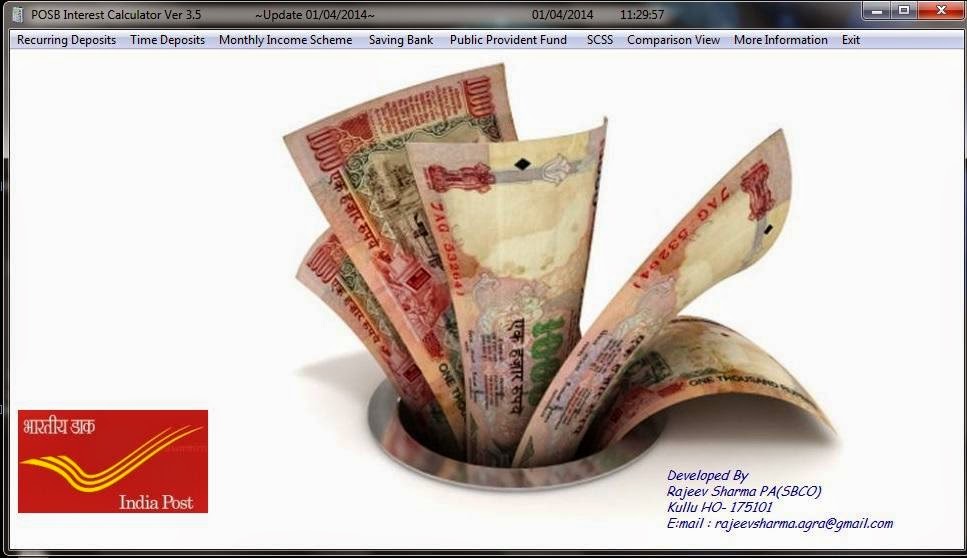
POSB Interest Calculator Ver 3.5 Update 01/04/2014.

POSB Interest Calculator Ver 3.5 Update 01/04/2014.

Written By Admin on April 1, 2014 | Tuesday, April 01, 2014


Futures: RD/All TD/MIS/SCSS/SB/PPF etc.


1. Calculate premature closure./Claim Closure

2. Calculate maturity closer with extended period.

3. PMI Calculation.

4. Loan Interest Calculation for RD/PPF accounts

5. with all relevant rules./ Comparison view


Download


Developed By

Rajeev Sharma PA(SBCO)
Kullu HO 175101

MEGHDOOT UPDATER 29.03.14 BY SRFIX

MEGHDOOT UPDATER 29.03.14 BY SRFIX

Written By Admin on April 2, 2014 | Wednesday, April 02, 2014


Meghdoot Updater 29.03.14 For Post Office

Meghdoot Updater 29.03.2014 for Update the Parcel Net Update dated 29.03.2014


Srfix For use in Post Office only.


https://googledrive.com/host/0B9bgr2DVPLD8elJlZGpfLVh0S1k/Updates9_290314.zip

FAQ on Children Education Allowance Scheme – Dopt Orders on 1.4.2014


FAQ on Children Education Allowance Scheme – Dopt Orders on 1.4.2014

Written By Admin on April 2, 2014 | Wednesday, April 02, 2014


No.1-11020/1/2014-EStt.(AL)
Government of India/Bharat Sarkar
Ministry of Personnel, Public Grievances and Pensions
Department of Personnel & Training

The following FAQs supplement the FAQs in respect of Estt.(Allowances) Section already placed in public domain vide F. No.21011/08/2013-Estt.(AL)

Establishment Allowances Section
Children Education Allowance Scheme (CEA)

SI. No.
Frequently Asked Questions
Answer
1.
Whether the examination fees as charged by the school is reimbursable?
“Examination fee” has been included as part of reimbursable items as indicated in para 1(e) of O.M. dated 2nd September, 2008, subject to the fulfillment of other existing conditions vide) OM No.12011/01/2012-Estt.(AL) dated 31-07-2013. The said orders do not have a retrospective effect.


2.
Whether reimbursement of amount of fee paid during 1at and 2nd quarter could be claimed in 3rd or 4th quarter, without the fee receipts of the 3rd and 4th quarter?
No. As it is reimbursement for the whole year, original receipts for the fee paid for the 3rd / 4th quarter has to be submitted to ensure that the child has not dropped out of the school in the mid-session. O.M. No.12011/01/2013-Estt. Allowances dated 23.04.2013 refers.

3.
Whether a Government servant is required to give a certificate that the spouse, if earning, has not claimed CEA?
Yes. In terms of O.M. No.12011/01/2013-Estt.(Allowances) dated 23.04.2013, the claimant Government servant is required to furnish an undertaking that reimbursement of CEA has not been claimed in respect of the child by the spouse of the claimant.


sd/-
(S.G.Mulchandaney)
Under Secretary