Thursday, December 31, 2015

Smart Driver For Backup Drivers - Google Drive Download Link

Smart Driver V2.1 Portable For Drivers Backup

Small tool to take backup all drivers.
Takes only few seconds to backup all drivers.

Simple and powerful backup Tool. Freeware

Download (Google Drive Link) Download

How To Fix USB Device Not Recognized Or USB Not Installed Problem

Several times I have faced problems with USB devices in all Windows versions. For instance a USB device (e.g. printer, scanner or webcam) is not functioning or a USB storage device (e.g. USB flash disk) is not detected at all. USB devices issues can occur for different reasons.

USB Errors – Symptoms that can fixed using this guide:

  1. USB Device not recognized
  2. USB Printer not recognized or not printing
  3. USB Storage device cannot be recognized or ejected through “Safely Remove” option.
  4. USB device driver not successfully installed or Windows cannot install USB device error.
  5. Unrecognized USB device in Device Manager (error code 43)

Solution : Solve USB problems with Microsoft USB Fix It utility.

1. First download the Microsoft Fix It utility to your computer.*
* Notes:
– Windows 8 & 8.1 users must download the Windows 8 USB Hotfix.
– Windows 7 USB Fix it Utility can work also for Windows Vista & Windows XP.
– Windows Vista users can try also the USB Devices Fix It utility for Windows Vista.
– Windows XP users can also try the USB Fix it for Windows XP.
Windows 8, 8.1, Server 2012: 
Windows 7, Vista & XP: 
Windows Vista (alternative): 
Windows XP (alternative): 

2. Run Microsoft Fix It tool and press “Accept”.
3. Select “Detect problems and apply the fixes for me (Recommended)” option.

4. Let the troubleshooter to fix USB problems and press “Next”.
If your problem is fixed, close the troubleshooter and check your USB devices functionality.

Courtesy : potools blog

Wednesday, November 4, 2015

Eligibility of widowed / divorced daughter for grant of family pension- clarification regarding


Government of India
Ministry of Defence
Department of Ex-servicemen Welfare
D(Pension/Policy)
Subject: Eligibility of widowed/ divorced daughter for grant of family pension- clarification regarding.
A copy of Department of Pension & Pensioners Welfare OM No. 1/13/09- P&PW(E) dated 28th April 2011 & 11th September 2013 on the above subject are forwarded herewith for your information and necessary action in the matter.
2. MoD (Fin/Pen) has been consulted

Friday, October 23, 2015

DOP Agent RD Bulk List Preparation at Agent Portal


Agent Portal can be accessed using the the website 
Every MPKBY/PRSS agents will get the usernames and passwords at the time of migration to Fiancle by the DOP IT Chennai.
  1. All the accounts linked to a particular agent will be displayed one the agent logons to web portal.
  2. Separate lists to be prepared for Cash/DOP Cheque(POSB Cheque) and NON DOP Cheque.
  3. The accounts opened before 15th should be paid on or before 15th and the accounts opened after 15th can be paid on or before last day of a month.

RD Bulk list preparation procedure:-

Open the URL for RD agent portal then the system will ask to enter the username and password enter both of them as shown
  • Then click on login then the system will ask to change the password after the first login then change the password.
  • Note that the system will give you chance to enter the password maximum of 10 times for unsuccessful attempts.
After entering the username and password then the system will show the following screen
Then click on Accounts tab as shown
  • Then click on Agent inquire and update screen as shown
  • Then the system will show the list of accounts attached to that agent as shown
  • Then select the mode of payment i.e., select mode as cash/dop cheque or non dop cheque as shown
  • Then in the next step select the list of account numbers you are trying to pay in the list for suppose if you are paying for 5 customers we have to select the 5 account numbers. 
  • Account numbers in the agent portal will be in ascending order so select them. For example if your 1st account number is in page1 select it and if next account number is page3 go to page3 and select the account number in this way select 5 account numbers in our example as shown and then click on save.
Note that after selecting all the account numbers only click on save maximum of 50 account numbers can be selected for 1 list for maximum of 20000 for cash and no limit for cheque.
Then in the next screen it will display the selected accounts as shown

FOR CASH MODE:-

Select first account number enter the no of installments and then click on get rebate and default then system calculates the default and rebate automatically as shown and enter the ASLAAS number of the customer and then click on save

FOR DOP/NON DOP Cheque:-

Select the account number enter the no of installments,enter the cheque number,enter the account number for RD installment(Bank account number on the cheque) and ASLAAS number and then click on save.
Then the system will show the message "installment saved successfully" as shown then the modified column for first record will change as "YES"
Then select the second record enter the no of installments,ASLASS number and then click on save as shown repeat this step for all the records.
After saving for all the records i.e., modified column will be "YES" for all the records then finally click on pay all modified installments as shown
  • Then click on pay all modified installments then system will generate the reference number with "C" as shown for cash,DC for DOP cheque and NDC for non dop cheque.
  • Then click on reports as shown 
  • Then enter the list reference number "________" and select status as "sucess" and then click on search then finally click on "OK" as shown
  • Then after clicking a PDF file will be generated take 2 copies and submit in the counter as shown in the below figure.
The detailed step by step procedure can be watched in the above video for preparation of RD bulk list for DOP Finacle.

BENEFITS OF OPENING OF SAVINGS ACCOUNT IN CBS POST OFFICE


Open Savings Account In A CBS Post Office To Avail All Benefits / Instant Alerts
  • Instant cash withdrawal and view of all financial transactions under one passbook / statement
  • Instant Issue of ATM cum Debit Card Free of Cost
  • Instant Issue of Cheque book free of cost.
  • No annual charges for ATM Card and Cheque books are also FREE of Cost.
  • No Need to visit Post Offices and Stand on queue for withdrawal of interest.
  • and more...


Courtesy : http://atppost.blogspot.in/

HOW TO USE PLI CUSTOMER PORTAL : INDIA POST


PLI Customer Portal Access Instruction


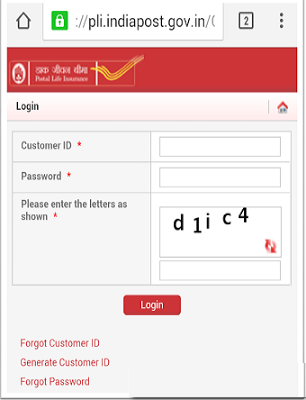
  • Choose PLI Customer Portal Link from

HOME PAGE OF CUSTOMER PORTAL 

  1. First use generate customer id and give your policy details, email id, phone number customer id
  2. Activation link to set password will be sent to your registered email id (password should contain number, special character, capital and small letter)

Full Instructions are available below to view / download

Document Complied and published by C. Siva Kabeer M.Sc Biotechnology Department of Posts

Share this article :

Monday, October 12, 2015

Account Freeze (HAFSM) in DOP Finacle


HAFSM is command is used for Account Freeze in case of Death / Pledge / Court Order. HAFSM stands for A/c Freeze status Maintenance 


  • Menu Shortcut - HAFSM > GO
  • The following screen appears

  • A/C ID - Account ID
  • Freeze Code -  Total Freeze
  • Freeze Reason Code - Select from Searcher
  • GO
  • The following screen appears
  • Select the Box as given in image
  • Submit
  • Login as supervisor
  • Menu Shortcut - HAFSM
  • Function - V-Verify
  • A/c ID - 
  • GO
  • Submit